


2026 Hyundai Palisade Hybrid Review: A Smarter Three-Row SUV for Families
While driving, what kind of in-car screen do you most want to see? Is it the clean and intuitive Apple interface, or the functionally flexible Google ecosystem?
Whether you drive a Toyota, Ford, or BMW, the in-vehicle infotainment system has become a core component of the modern driving experience. And in this field, two giants dominate—Apple CarPlay and Google Android Auto. But what exactly are the differences between the two? Which one better suits your driving habits?
Today, from a global perspective, we will delve into a detailed comparison of the latest features, market performance, and future development trends of these two in-car systems. Whether you are an iPhone user or an Android user, this article will help you make an informed choice.
The core difference between Apple CarPlay and Android Auto lies in ecosystem affiliation, device compatibility, and functional details—the former relies on Apple’s iOS closed ecosystem to deliver a stable, consistent connectivity experience, while the latter, based on Android’s open ecosystem, offers flexible and diverse functional expansion.
In other words, CarPlay is a natural extension of the Apple ecosystem. It requires an iPhone with iOS 7.1 or later, and its interface continues the minimalist style of iOS. Apps must undergo Apple’s whitelist review, and Siri voice control is highly consistent with the logic of Apple devices. This means Apple users can get started with virtually zero learning curve.
In contrast, Android Auto is compatible with devices running Android 5.0 and above and adopts Google’s Material Design style. Leveraging the openness of the Android system, it supports more third-party applications, allowing users freedom from being restricted to platform-built services. However, due to Android fragmentation, there is a slight deficiency in experience consistency.
Quick Core Differences Comparison Table:
| Comparison Dimension | Apple CarPlay | Android Auto |
| Ecosystem Affiliation | iOS Closed Ecosystem | Android Open Ecosystem |
| Device Compatibility | iPhone only (iOS 7.1+) | Most Android phones (Android 5.0+) |
| App Review Mechanism | Strict whitelist review | More open, more third-party apps |
| Interface Style | iOS style, clean and intuitive | Material Design, high customizability |
| Voice Assistant | Siri | Google Assistant (gradually being replaced by Gemini) |
| User Satisfaction | 850 points (out of 1000) | 825 points (out of 1000) |
Let’s first talk about the interface—this is the screen you see every day while driving, and its design directly impacts your driving experience.
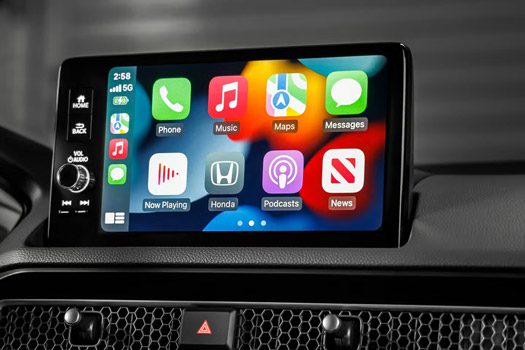
CarPlay’s interface follows Apple’s consistent design philosophy. It uses large icons and a streamlined dashboard view that integrates functions like navigation, music, and Siri suggestions, minimizing driver distraction and visual shift. The latest iOS 26 update brings a new “Liquid Glass” design to CarPlay, with icons exhibiting a transparent texture and softer corners, resulting in a more modern overall visual effect.
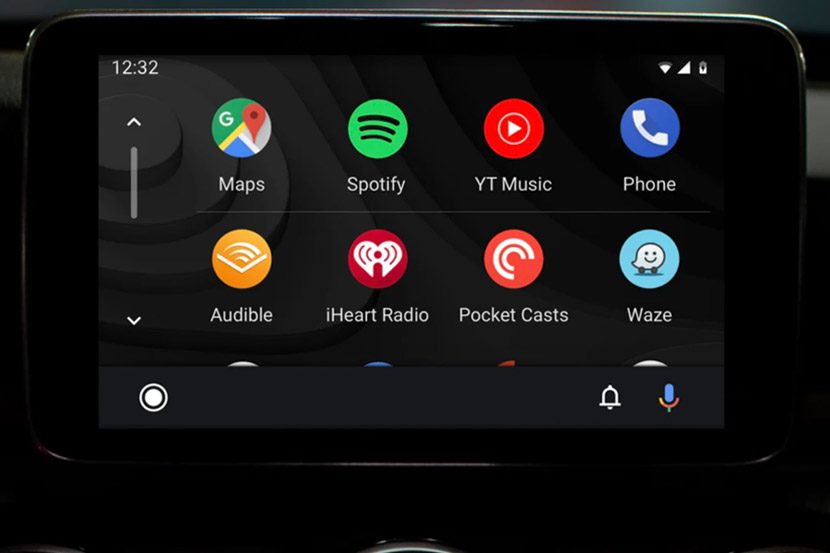
Android Auto uses a card-based design and supports split-screen multitasking. You can check navigation while simultaneously controlling music playback or getting real-time weather information. Its interface emphasizes customizability—you can rearrange app icons, adjust color schemes, and even have the interface automatically match the color tone of your phone’s wallpaper.
So, which one is safer? Research indicates that interfaces requiring less visual shift and shorter interaction times reduce cognitive load. CarPlay’s minimalist design generally allows common tasks (like making a call or setting navigation) to be completed faster. However, Android Auto’s deep integration with Google Maps and Google Assistant gives it an advantage in contextual awareness and proactive suggestions.
The app ecosystem is one of the areas where the differences between the two are most pronounced.
CarPlay’s review mechanism for third-party apps is stricter, allowing only whitelisted, adapted apps to connect. While this closed nature limits app diversity, it ensures functional stability and operational security. Mainstream navigation and music apps are deeply optimized and rarely experience lag or crashes. CarPlay currently supports over 600 curated apps.
One of Android Auto’s greatest strengths is its openness to third-party applications. Google’s in-car platform continues the design philosophy of Android phones—flexibility and choice. This means you are not limited to a small set of “approved” apps; instead, you can access a wider range of navigation, music, messaging, and utility tools. You can find apps for parking, fuel prices, EV charging, and point-of-interest discovery, all optimized for in-car use.
Both systems support mainstream navigation apps (Google Maps, Waze), music apps (Spotify, QQ Music, NetEase Cloud Music), and communication functions. However, Android Auto’s selection of apps is noticeably broader, especially with more comprehensive coverage of localized services.
The voice assistant is crucial for safe driving—it allows you to perform tasks without taking your hands off the steering wheel.
Siri, featured in CarPlay, excels at handling single-function commands, such as “Play my favorites playlist” or “Navigate to the nearest coffee shop.” Its operational logic is highly consistent with the iPhone, enabling Apple users to adapt quickly.
The Google Assistant built into Android Auto maintains a lead in natural language understanding and search accuracy. It leverages Google’s powerful search engine and real-time data to answer complex questions. A driver can say, “Show me charging stations with restrooms along my route,” and receive a sorted list. This significantly reduces the need for screen interaction.
More importantly, Google is gradually replacing Google Assistant with Gemini AI to provide a more natural, conversational in-car voice experience. Gemini can extract contextual information across applications (for example, extracting an address from an email for navigation), further enhancing the intelligence level of voice interaction.
Navigation is the most frequently used function of in-car systems and is a major advantage for Android Auto.
Android Auto defaults to Google Maps, which provides richer real-time data: live traffic updates, accident reports, construction zones, and even crowdsourced speed trap alerts. Its lane guidance and 3D intersection views are particularly clear in complex urban environments. These visual cues help drivers make decisions earlier, reducing last-minute operational stress and lane-change risks.
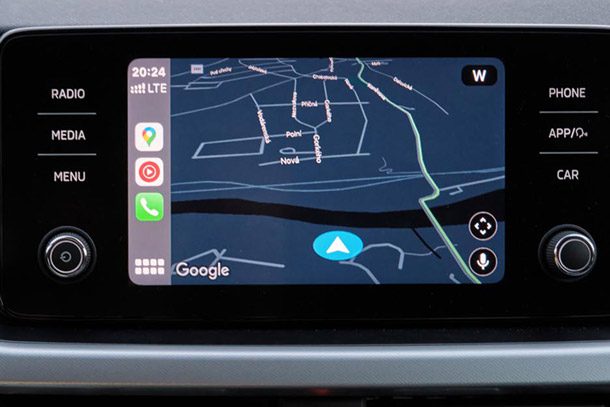
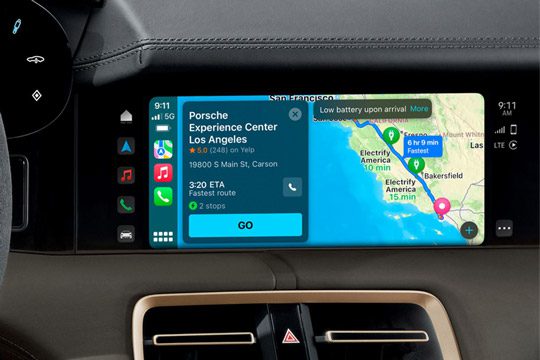
CarPlay defaults to Apple Maps. Although Apple Maps has improved continuously in recent years, especially in terms of its “Look Around” feature and interface simplicity, it still lags behind Google Maps in global coverage and depth of real-time information. However, CarPlay users can also download Google Maps as an alternative, which partially compensates for the shortcomings of the native map app.
CarPlay is supported by over 800 car models, covering 77 mainstream global automakers. For the 2025–2026 model years, nearly all new car models in the U.S. come standard with CarPlay; it is almost ubiquitous. Wireless CarPlay has been widely supported since iOS 9, and currently, most new vehicles with CarPlay support the wireless function as standard.
Android Auto is supported by approximately 500 car models. The wireless function has also developed rapidly in recent years, but its penetration rate is relatively lower and depends more on the specific implementation by automobile manufacturers.
The setup process for CarPlay is smoother—it starts automatically once an iPhone is connected, requiring no additional app download. Android Auto requires downloading a dedicated app from the Google Play Store before wired or wireless pairing can occur.
From a global perspective, the acceptance of CarPlay and Android Auto varies significantly across different regions.
In North America, both enjoy widespread acceptance. The United States is a frontier market for technology consumption, with consumers generally showing high receptivity to new technologies and smart devices. CarPlay holds a dominant position in the North American market, accounting for 38.5% of global revenue.
In the European region, demand patterns are more complex. Consumers in countries like Germany and the UK recognize the convenience CarPlay offers, but on the other hand, the proprietary in-car systems of local automotive brands (such as Mercedes-Benz MBUX and BMW iDrive) already possess excellent functionality, leading some consumers to prefer using the factory-installed systems.
In the Chinese market, the situation is also noteworthy. With the widespread adoption of smartphones and growing consumer demand for smart connectivity, CarPlay has gained a certain level of popularity. At the same time, Chinese domestic automotive brands are actively developing their own intelligent in-car systems, deeply integrating them with the domestic internet ecosystem to offer localized features such as online payments and social entertainment.
It is worth noting that the Chinese automotive market is undergoing profound transformation. In recent years, the pace of Chinese auto exports has accelerated—whether it is new energy vehicle manufacturers or traditional OEMs, more and more Chinese-made cars are being sold globally, particularly performing strongly in Southeast Asia, Europe, the Middle East, and Latin American markets. This means that, on one hand, Chinese consumer expectations for in-car smart connectivity systems are rising; on the other hand, Chinese automakers are generally equipping export models with CarPlay and Android Auto systems to meet the connectivity needs of overseas users. This trend is profoundly influencing the landscape of the global in-vehicle infotainment market.
Both systems are undergoing rapid iteration and upgrades, and the future competitive landscape will become even more intense.
CarPlay’s Development Direction:
Apple is introducing CarPlay Ultra (Next-Generation CarPlay), which transcends the limitations of the central screen and can display content across multiple screens, including the instrument cluster and information displays, showing data such as speedometer, tachometer, range, maps, and media information. The iOS 26 update also brings customizable widgets, Live Activities, Tapbacks quick replies, and other features, further enhancing the user experience. The 2026 update also introduces native ChatGPT support, further strengthening AI integration capabilities.
Android Auto’s Development Direction:
Google is fully integrating Gemini AI into Android Auto, expected to completely replace Google Assistant by March 2026. The Android Auto roadmap also includes support for video applications, widget functionality, a light theme, and deeper vehicle integration. Furthermore, Google is advancing Android Automotive OS (the native vehicle operating system), expanding it from a phone projection protocol into a complete vehicle operating system.
So, which one should you choose? Here is a practical decision-making guide:
Choose CarPlay if you:
Choose Android Auto if you:
In cases where both are supported:
If your vehicle supports both CarPlay and Android Auto (as most new cars do), you can certainly try both to find the system that suits you best. Notably, the most popular U.S. car models for 2025—including the Ford F-150, 2026 Toyota RAV4, and 2026 Chevrolet Silverado—all include both systems by default.
Q1: Do CarPlay and Android Auto require an additional fee?
A1: Both are free to use, but you need a compatible smartphone. Some vehicles may offer wireless connectivity as an optional extra.
Q2: Does every car that supports CarPlay also support Android Auto?
A2: Not necessarily. While most new cars support both, some models only support one or the other. It is advisable to confirm the specific configuration with the dealer before purchasing.
Q3: How can I achieve a wireless connection?
A3: If your vehicle natively supports wireless functionality, simply pair it via Bluetooth. If your vehicle only supports wired connections, you can purchase a wireless adapter (around $10) to enable wireless functionality.
Q4: Which system consumes less battery power?
A4: Wireless connections consume more phone battery than wired connections. It is recommended to use a wired connection during long drives, which keeps the phone charging while providing stable data transmission.
Q5: Can I change the default map if I don’t like it?
A5: Yes. CarPlay supports third-party navigation apps like Google Maps and Waze, and Android Auto likewise supports multiple navigation choices.
The competition between Apple CarPlay and Android Auto is, in essence, a battle of ecosystems. CarPlay excels with the stability and smoothness of a closed ecosystem, while Android Auto leverages the flexibility and expandability of an open ecosystem. Both are continuously evolving, striving to provide drivers worldwide with a safer and more convenient in-car experience.
Regardless of which one you choose, the most important thing is—it allows you to focus more on the road while driving, while still enjoying the convenience brought by your smartphone. After all, that is the ultimate goal of in-car smart connectivity.

